
HTML is short for HyperText Markup Language. Firefox, Google Chrome, Safari and the other browsers read HTML and change it into the thing that you see.
If you think about a web page like a building, then HTML is the skeleton of that building.
HTML has some different versions, but the version that people use the most today is HTML5. In this course I also put my focus on HTML5.
To start, let us make a very simple page with HTML. Make a file with the name index.html and put the code below inside it:
<!DOCTYPE html>
<html>
  <head>
      <title>Hello World</title>
  </head>
  <body>
      <h1>Hello, World!</h1>
      <p>This is my first HTML page.</p>
  </body>
</html>Now open this file with your browser. You see a white page with a big title that says “Hello, World!” and one paragraph under it.
<!DOCTYPE html> — tells the browser that this is an HTML5 document. If it is not there, the browser goes to the old way (quirks mode) and shows strange behaviour. Always write this line at the top of every HTML file.<html> — our story starts here, where we define <head> و <body> .<head> — it holds information that you do not see on the page, but that gives useful information to the software that reads the page (search engines too).<title> — the title of the page, which the browser shows in the tab.<body> — everything that the user sees goes here.<h1> — the title of the page<p> — a paragraphEvery web page has this minimum structure.
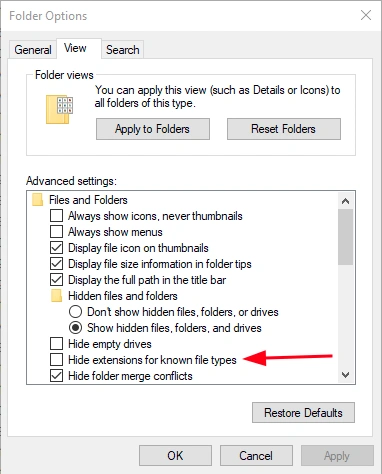
If you use Windows, open the File Explorer settings and turn on the option below. When this option is on, Windows shows the file extensions. This means that when you make a file called index.html, its format is really html. If you do not do this and you make index.html, the file that is really made is index.html.txt, and by default Windows does not show you the txt part.
Many new students lose a lot of time because they do not know this. The place of this option is not the same in all Windows versions, but with a little search and some help from AI you will find it for sure.
A tag is the building unit of an HTML page. We write every tag with the signs > و < . Most tags have a start and an end. We usually call the first one the opening tag and the last one the closing tag.
<tagname>content</tagname>In the code above, <tagname> is the opening tag and </tagname> is the closing tag.
Some tags have a structure like the one below. They close themselves, which means nothing goes inside them and they do not accept another tag as a child.
<tagname />We can put HTML tags in two main groups:
These tags have a start and an end, and they wrap the content inside them. In other words, other tags can sit inside them as children. Below you see some of these tags.
<p> — a paragraph<h1> to <h6> — the headings<div> — a general section box<a> — a link<form> — a form (later in this course I talk about it in detail)<ul>, <ol>, <li> — the listsThese tags have no content and no closing tag (or they are their own end). They make something that we can see only with the values that they get as attributes. Below you see some of these tags.
<img /> — an image<input /> — an input field of a form<meta /> — metadata inside headAttributes are extra information that we put inside the opening tag. They say how that tag behaves or what features it has. The general structure:
<tagname attribute="value">content</tagname>A real example:
<a href="https://example.com">Click here</a>
<form method="post" action="/submit">
<input type="text" name="email" required>Look, here href ، method ، action ، type ، name و required are all attributes. Some of them, like required have no value (Boolean Attribute), and only being there means that they are on.
I upload all CodeBaz videos and podcasts on platforms such as YouTube and SoundCloud, which are often restricted in Iran.
Most tutorials come with both video and podcast formats. Therefore, if you want to make the most out of the site’s content, you will need to use a VPN.
Please note that for shopping in the store, it’s better to turn off your VPN to avoid issues with payment and banking connections.